The SMS doesn't arrive
You sent a request, but your customer says nothing arrived? Usually the reason is already in the list. Go through these points in order.
- Step 1:
Look at the status
Open Requests and find the customer under “Sent”. Click their name: the history shows every step with its time.
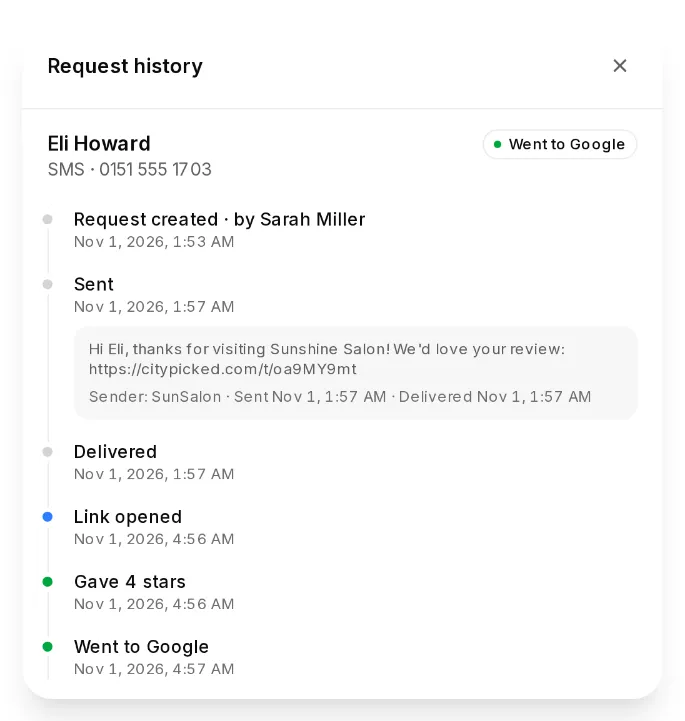
- Step 2:
“Scheduled”: it's still waiting
The request is waiting for the time you picked or for your sending hours. Nothing goes out on Sundays while “Also send on Sundays” is off. “Send now” under “Actions” sends it at once.
- Step 3:
“Not delivered”
The number couldn't receive the SMS, for example because it is wrong or not a mobile number. Check the number with your customer and send again. You get the credits back.
- Step 4:
“Delivered”, but nothing there
Then the SMS reached the phone. Some phones sort messages from unknown senders into a separate folder. Ask your customer to look there.
Reasons Citypicked shows when sending
- “Number or address not valid” or “Landline, SMS not possible”: the number doesn't work. Use a mobile number, best with the country code.
- “Not enough credits”: buy credits or switch on “Top up automatically”.
- “Already asked on … (Don't ask twice)”: the customer got a request recently.
- “Unsubscribed”: the customer wants no more messages, so nothing goes out to them anymore.
- “No SMS sender for this country yet”: SMS to the US and Canada need a sender number first. We set it up for you; it takes about a week. Until then, ask these customers by email.