Send your first request
A short message after the visit is enough. Here is how to send your first review request by SMS, email or WhatsApp in under a minute.
- Step 1:
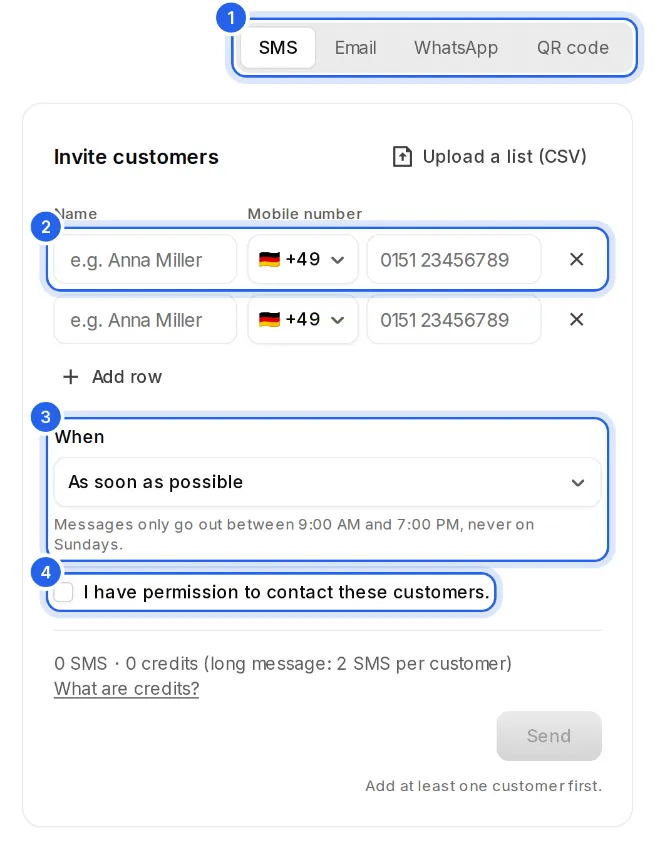
Click “Requests” on the left. At the top, choose SMS, email or WhatsApp.
- Step 2:
Type your customer's name and mobile number (or email address). With “Add row” you ask several customers at once, up to 50.
- Step 3:
Under “When”, choose whether the request goes out as soon as possible or later, for example “In 2 hours” when the customer should get home first.
- Step 4:
Check “I have permission to contact these customers.” and click “Send”.
When it goes out
Requests only go out during your sending hours. Outside them, the request waits for the next allowed time, and the form tells you when beforehand.
Want it to go out right away? In the list, click “Actions” on the request and then “Send now”. It goes out at once, even outside your sending hours.