Reminders: a friendly follow-up
Some customers mean to leave a review and then forget. A short reminder after a few days brings them back, and anyone who already rated gets none.
- Step 1:
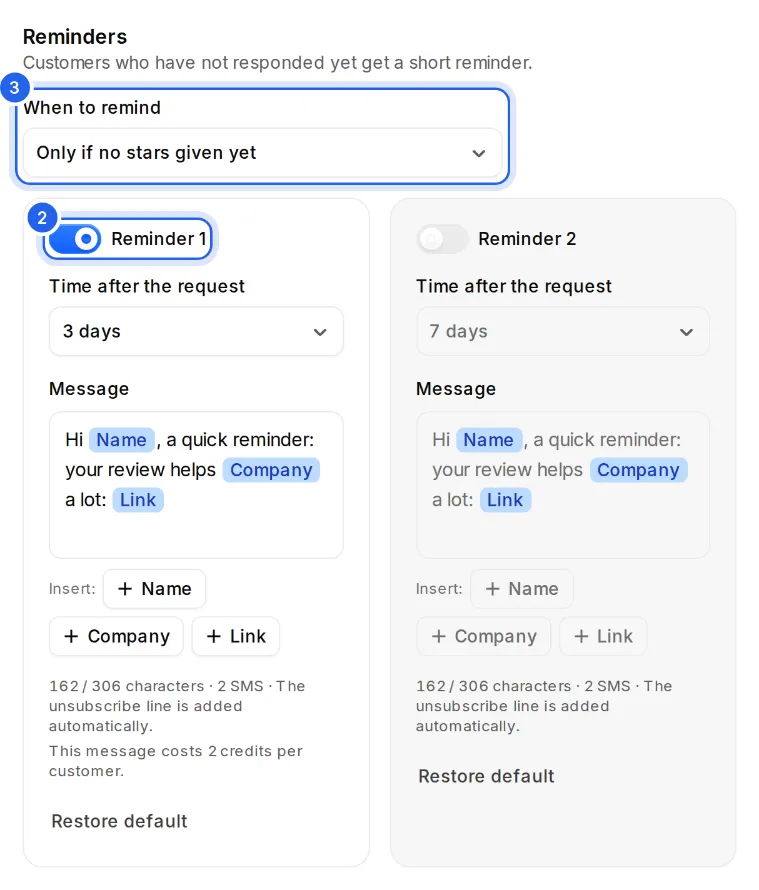
Open Requests and click “Edit message”. Under “Reminders” you see Reminder 1 and Reminder 2.
- Step 2:
Each reminder has its own switch. Reminder 1 is on from the start and comes after 3 days; switch on Reminder 2 if you like. Under “Time after the request” pick 1 to 14 days. Reminder 2 must come after Reminder 1.
- Step 3:
Under “When to remind”, choose “Only if no stars given yet” or “Only if the link was not opened”.
- Step 4:
You edit each reminder's text right below it, separately for SMS and email. The timing and the condition apply to both. Everything saves right away.
Good to know
- Reminders only go out during your sending hours, like the request itself.
- When a customer gives stars, writes to you privately, goes on to a review site or unsubscribes, their reminders stop.
- With WhatsApp you send the messages yourself, so there are no automatic reminders there.
- SMS reminders come with Pro and Business. On the other plans, reminders go out by email only and use no credits.
- An SMS reminder costs credits like any SMS. Before you send, the form tells you the most reminders can cost later.