Edit your message and sender name
The templates already fit, but you want them in your own voice? Here is how to change the text, subject and sender name, with a preview, without breaking anything.
- Step 1:
Open Requests and click “Edit message”. At the top, choose SMS, email or WhatsApp.
- Step 2:
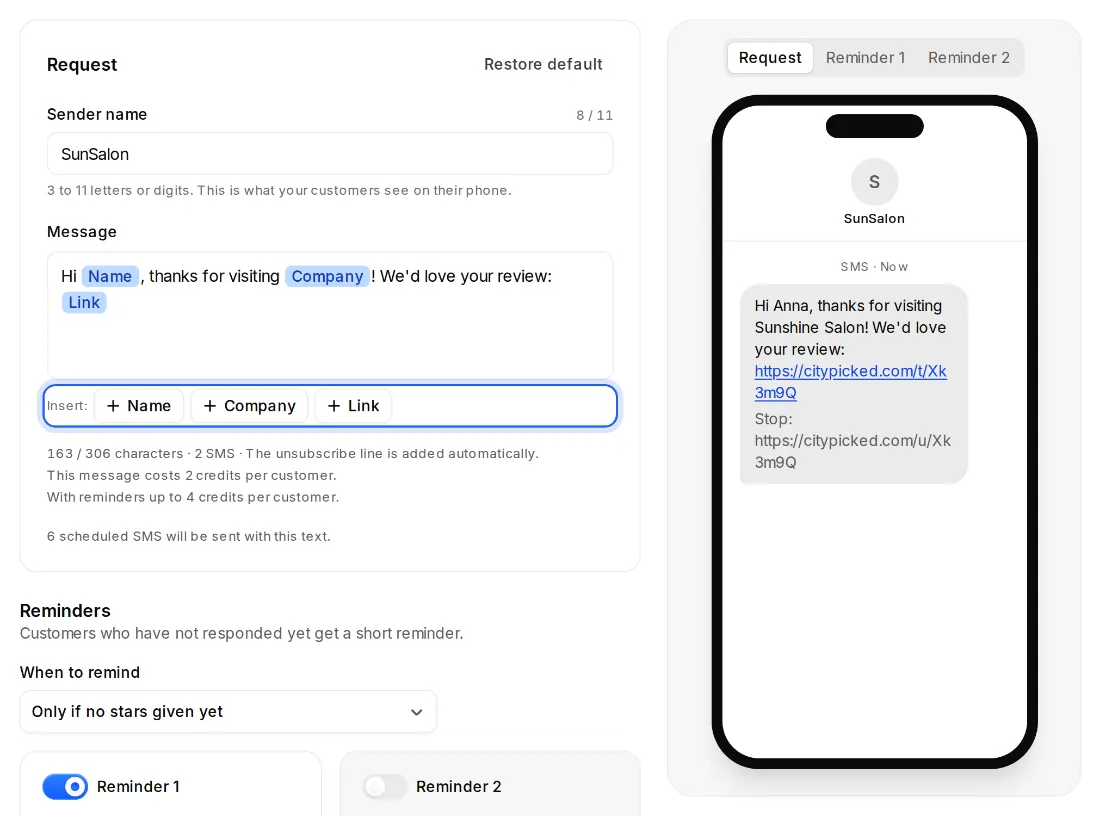
Change the text. With the Name, Company and Link placeholders, Citypicked fills in your customer's name, your business and your link when it sends.
- Step 3:
On the right you see right away how the message looks on a phone. For SMS, the counter shows the characters and how many SMS it becomes.
- Step 4:
Everything saves right away. “Restore default” brings the template back.
Rules that protect you
- The link to your review page must be in the message exactly once. If you delete it, Citypicked puts it back at the end.
- Citypicked adds the unsubscribe line to SMS automatically.
- SMS sender: 3 to 11 letters or digits, no spaces or accents. You can also change it under Settings, Sending.
- Email sender: what your customers see in their inbox, at most 40 characters. The subject has at most 150 characters.