Read your analytics: from request to review
Is asking worth it? Analytics shows you in numbers how many customers open your requests, how many stars they give and how many go on to Google.
- Step 1:
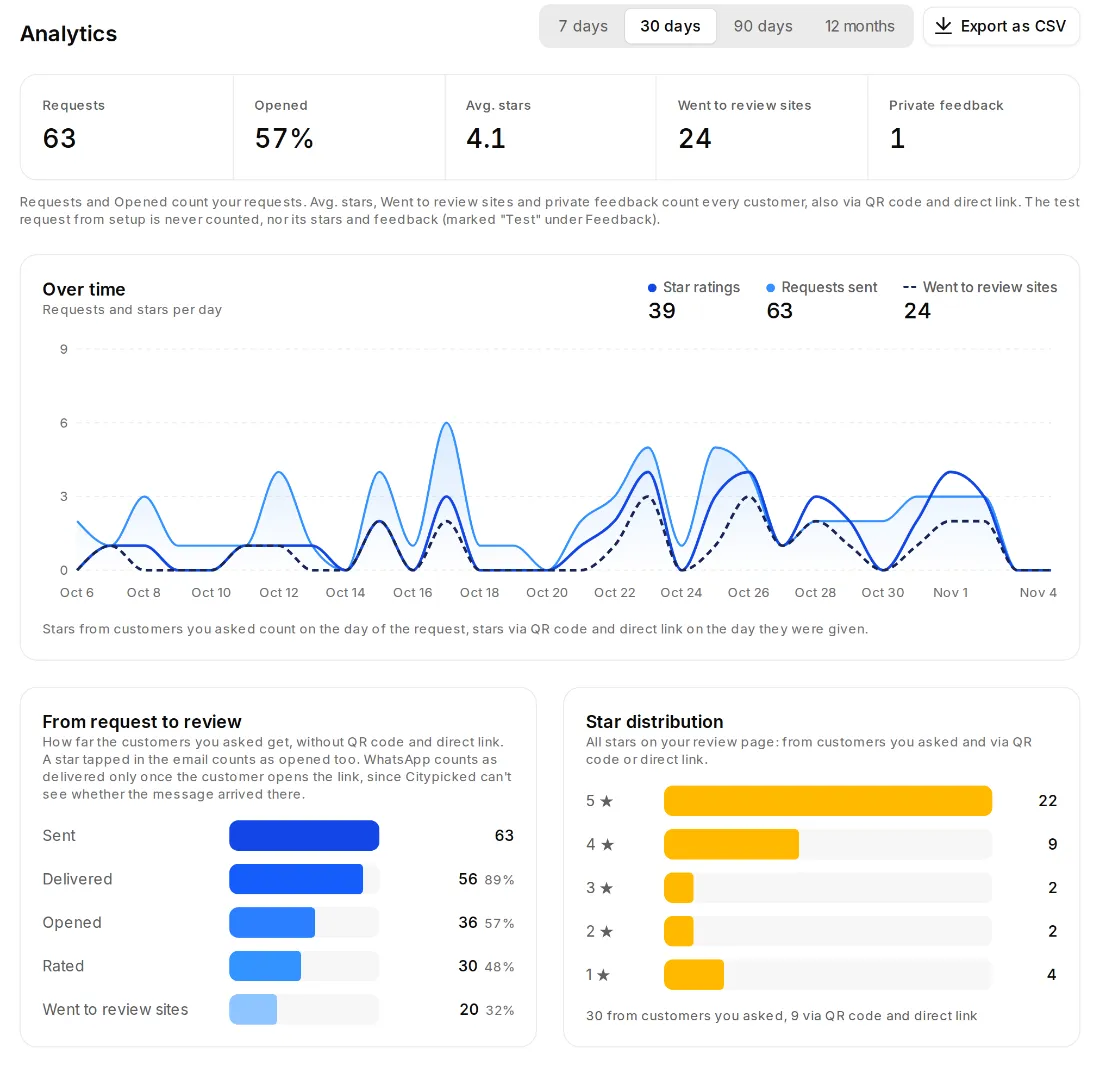
Click “Analytics” on the left and choose the period at the top: 7 days, 30 days, 90 days or 12 months.
- Step 2:
At the top you see five numbers: Requests, Opened, Avg. stars, Went to review sites and Private feedback.
- Step 3:
“From request to review” shows how far the customers you asked get: Sent, Delivered, Opened, Rated, Went to review sites. Where most drop off is worth a look.
- Step 4:
Further down: the trend over time, the star distribution, requests by channel, channels compared, QR scans by code and who on your team sends how many requests. “Export as CSV” gives you the numbers as a file.
How Citypicked counts
- Requests and Opened count your requests. Avg. stars, Went to review sites and Private feedback count every customer, also via QR code and direct link.
- A star tapped in the email counts as opened too.
- WhatsApp counts as delivered only once the customer opens the link, since Citypicked can't see whether the message arrived there.
- The test request from setup is never counted, nor its stars and feedback.