Read and answer private feedback
Everything customers write to you privately lands under Feedback. Here is how to keep track, reply by email and note what is done.
- Step 1:
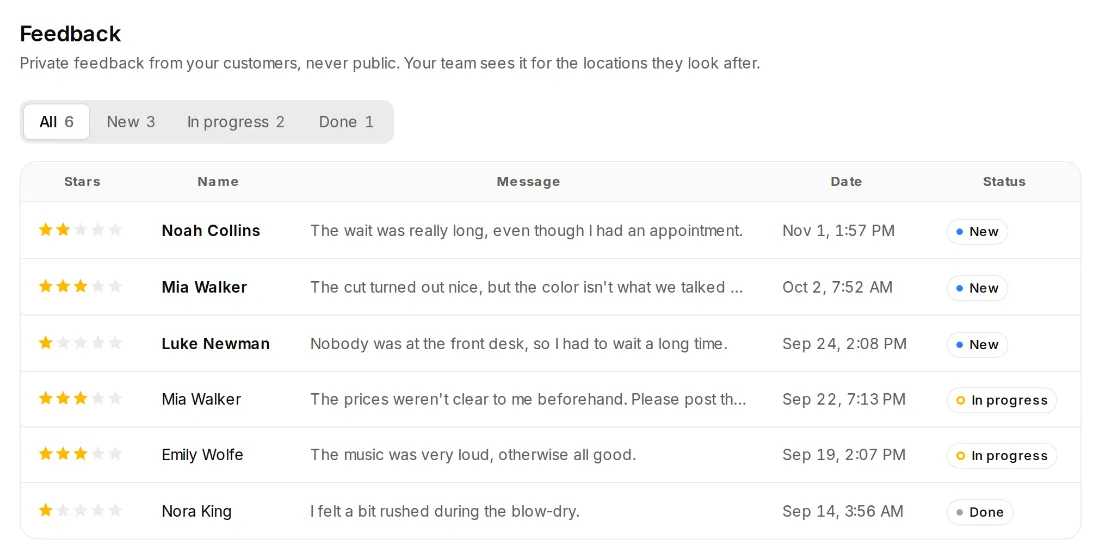
Click “Feedback” on the left. The number next to it shows how much new feedback there is. At the top you filter by All, New, In progress and Done.
- Step 2:
Click a message. You see the stars, the text and the contact details the customer left.
- Step 3:
Under “Reply by email” there is a draft you can adjust. “Send reply” sends it to the customer. If they left no email address, the page tells you, and you get in touch another way.
- Step 4:
Change the status and add a note if you like. Notes are only visible to your team.
Good to know
- Private feedback is never public. It doesn't appear on any review site.
- Staff see feedback for the locations they look after.
- With several locations, Feedback shows the chosen location. New feedback at another location is announced at the top, with “Switch there”.
- You choose the form's fields under Review page, Form: first name, last name, email and phone, each Required, Optional or Off. The message is always part of it.